scDoRI: Single-cell Deep Multi-Omic Regulatory Inference#

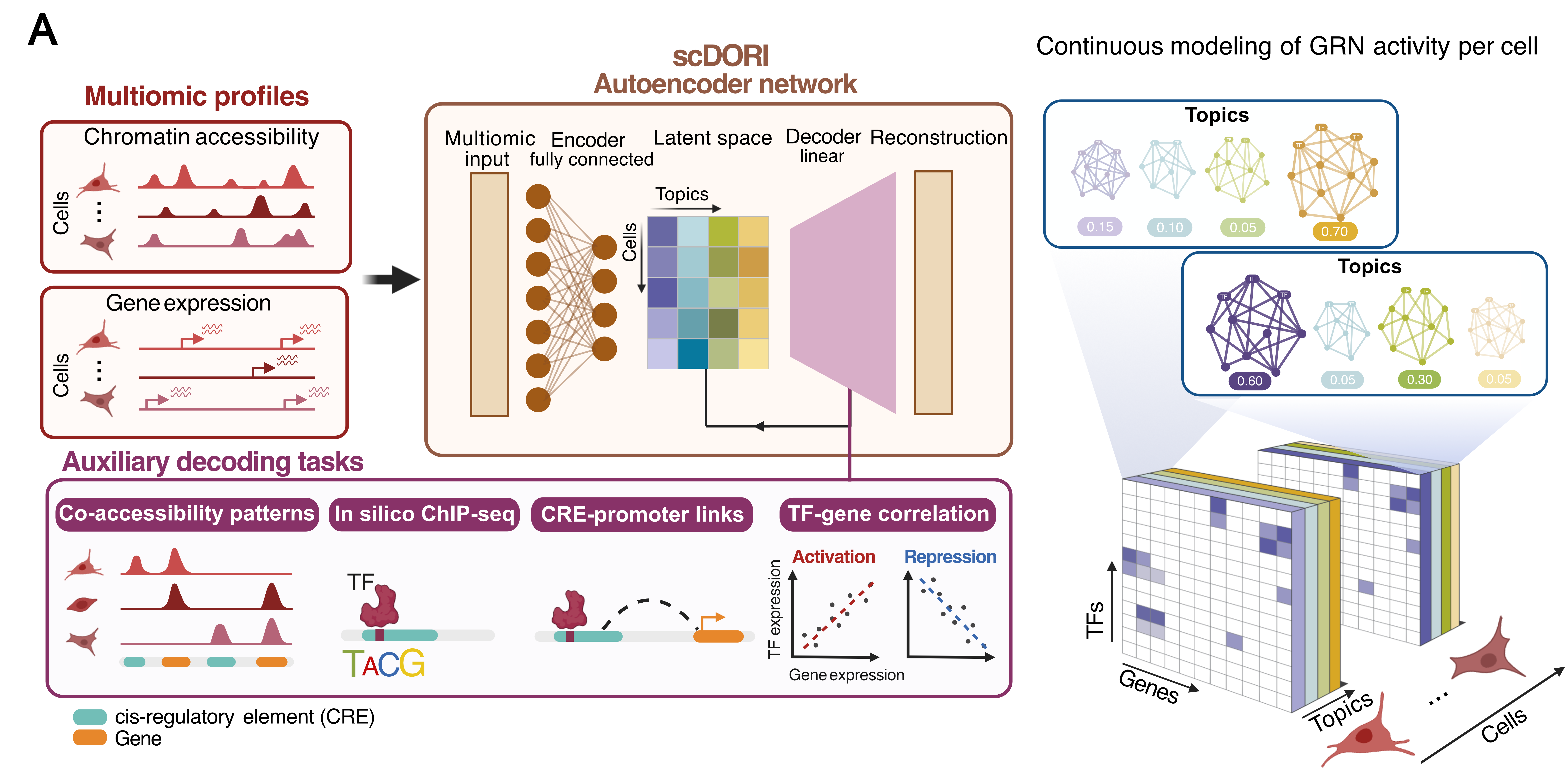
scDoRI is a deep learning model for single-cell multiome data (RNA + ATAC in same cell) that infers enhancer-mediated gene regulatory networks (eGRNs). By combining an encoder–decoder approach with mechanistic constraints (enhancer–gene links, TF binding logic), scDoRI learns topics that group co-accessible peaks, their cis-linked genes and upstream activator and repressor TFs – all while scaling to large datasets via mini-batches.
Highlights#
🔄 Unified approach: a single model for dimensionality reduction + eGRN inference
🧠 Learns topics that represent cell-state-specific regulatory programs
🧬Continuous eGRN modelling : each cell is a mixture of topics, allowing the study of changes in GRNs. No need for predefined clusters
🧰 Scalable to large datasets via mini-batch training
Input Requirements#
scDoRI expects single-cell multiome data with the following inputs:
RNA: an AnnData.h5adobject with cells × genes expression matrixATAC: an AnnData.h5adobject with cells × peaks accessibility matrixPeaks must include genomic coordinates in
.var(columns:chr,start,end)
These datasets must be paired — i.e., RNA and ATAC should come from the same cells. Make sure that .X of anndata objects contain raw counts.
Installation#
To install all dependencies for scDoRI, we recommend using Conda or Micromamba. The installation should take a couple of minutes.
git clone https://github.com/bioFAM/scDoRI.git
cd scDoRI

# create a new environment
conda create -n scdori python=3.12 -y
conda activate scdori

# Install BEDTools dependencies, e.g., via conda (if not installed on your system)
conda install --channel conda-forge --channel bioconda bedtools htslib -y

# Install the scDoRI package
pip install -e .
Make sure the -e flag is used to install the package in editable mode.
The training process is GPU-accelerated and highly recommended to be run on a GPU-enabled machine. While preprocessing can run on CPU, training large datasets on CPU is not advised due to slow performance. If a GPU is available, the GPU-accelerated version will be installed automatically.
Usage#
You’ll work through three notebooks - Preprocessing, Training and Downstream analysis. This will require two separate config files to set parameters for your dataset preprocessing and training.
Step 1: Preprocessing#
Edit paths and parameters in:#
src/scdori/pp/config.py
to specify the location of RNA and ATAC anndata .h5ad files, motif file, and set number of peaks/genes/TFs to train on.
Run preprocessing notebook#
docs/notebooks/preprocessing.ipynb
This step can take between a few hours to a day depending on the dataset size and number of features selected.
Step 2: Training#
Edit paths and parameters in:#
src/scdori/_core/config.py
for scDoRI hyperparameters (number of topics, learning rate, epochs etc.) and specify path for preprocessed anndata objects and insilico-chipseq files
Run training notebook#
docs/notebooks/training.ipynb
This step again can take between a few hours to a day depending on the dataset size and number of features selected.
Step 3: Downstream analysis#
Run downstream analysis notebook#
docs/notebooks/downstream.ipynb
Dataset Demonstration#
The provided notebooks use the mouse gastrulation dataset from:
📄 Paper: Argelaguet et al., Bioarxiv 2022 📦 Download: Dropbox link
Configuration Notes#
preprocessing_pipeline/config.py provides flexible options:
You can set the number of peaks, genes, and TFs to use for model training
💡 Tip: Adjust based on your available GPU memory
You can also force inclusion of specific genes or TFs, even if they aren’t highly variable
Useful for focusing on known regulators/ genes of interest
Documentation#
📖 Full documentation and API reference is hosted at: https://scdori.readthedocs.io/en/latest/
Includes:
API reference (docstrings)
In-depth method overview
Preprocessing + training guides
(upcoming) Customization tips
Citation#
If you use scDoRI in your work, please cite our preprint. Feel free to open an issue or get in touch at manu.saraswat@dkfz.de